
Tasks. Raise it, route it, close it.
Every incident, request and observation across your terminals in one log. A task type sets the department and the escalation clock, so work raised from the floor, a kiosk rating or a missed round lands with the right team and closes with proof.
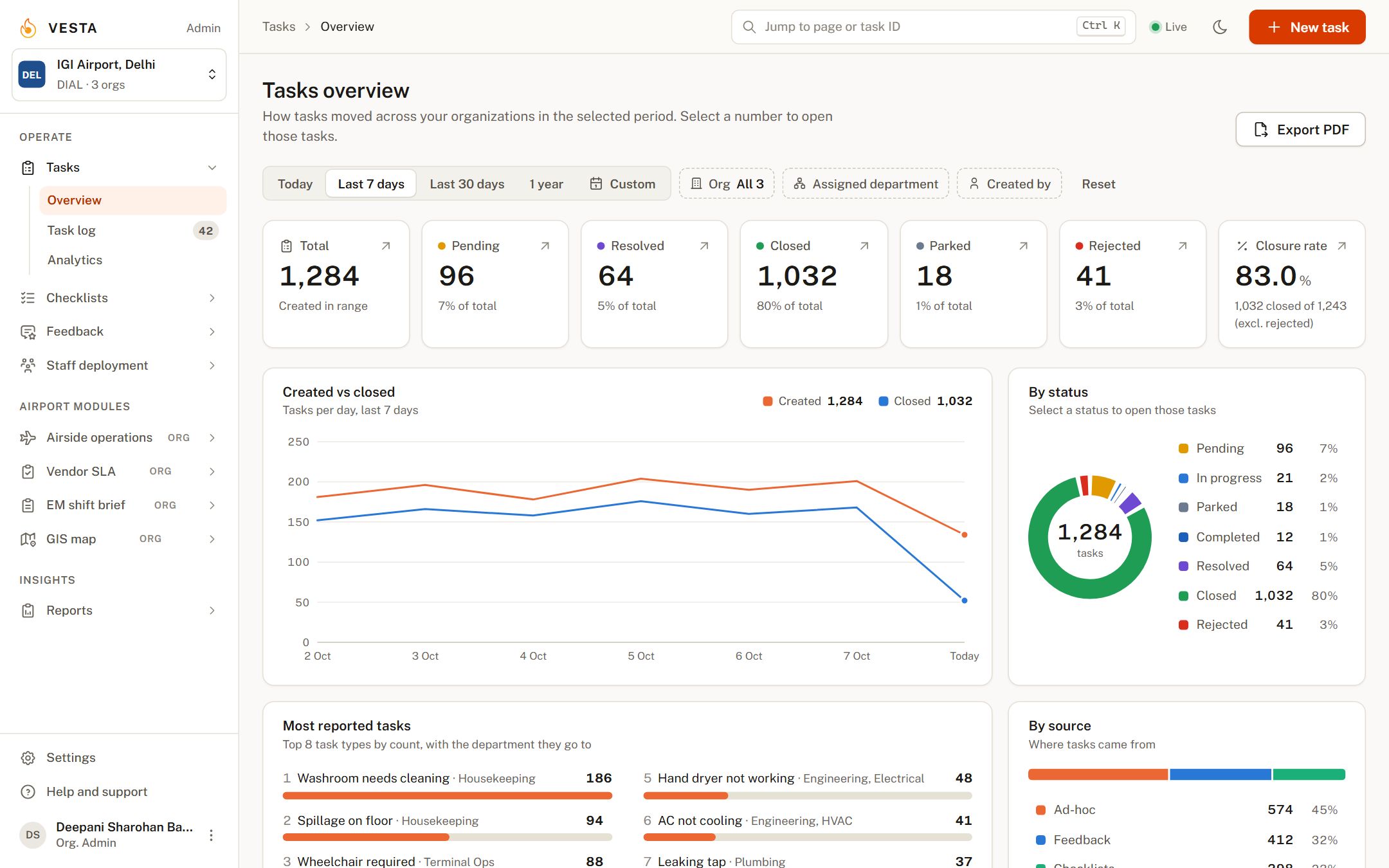
Tasks, in six parts.
Auto-allocation
A task type carries its department and escalation time. Raise a task from a phone, the desk, a guest rating or a checklist answer; it is assigned before anyone picks up a phone.
Escalation matrix
Levels per department, in minutes. A task nobody touches moves up, and the next deadline is shown on the task itself.
Photo and file evidence
Unlimited attachments. Before and after photos sit on the task record, so closure is something you can see.
SLA tracking
Turnaround measured against your agreements, by department, vendor and task type.
Realtime updates
Push, email and SMS. New tasks and status changes reach the people on shift as they happen.
Reports that send themselves
Operational efficiency, daily incidents and SLA reports, on a schedule, to the inboxes you choose.
Three steps, every time.
Raise
Pick the task type, the location and a photo. Or let a poor guest rating or a failed checklist item raise it for you.
Route and escalate
The department is set by the task type. If it stays open past its clock, it escalates a level and the next person is told.
Close with proof
A photo and a comment close the task. Time to close, by department and type, feeds the analytics.
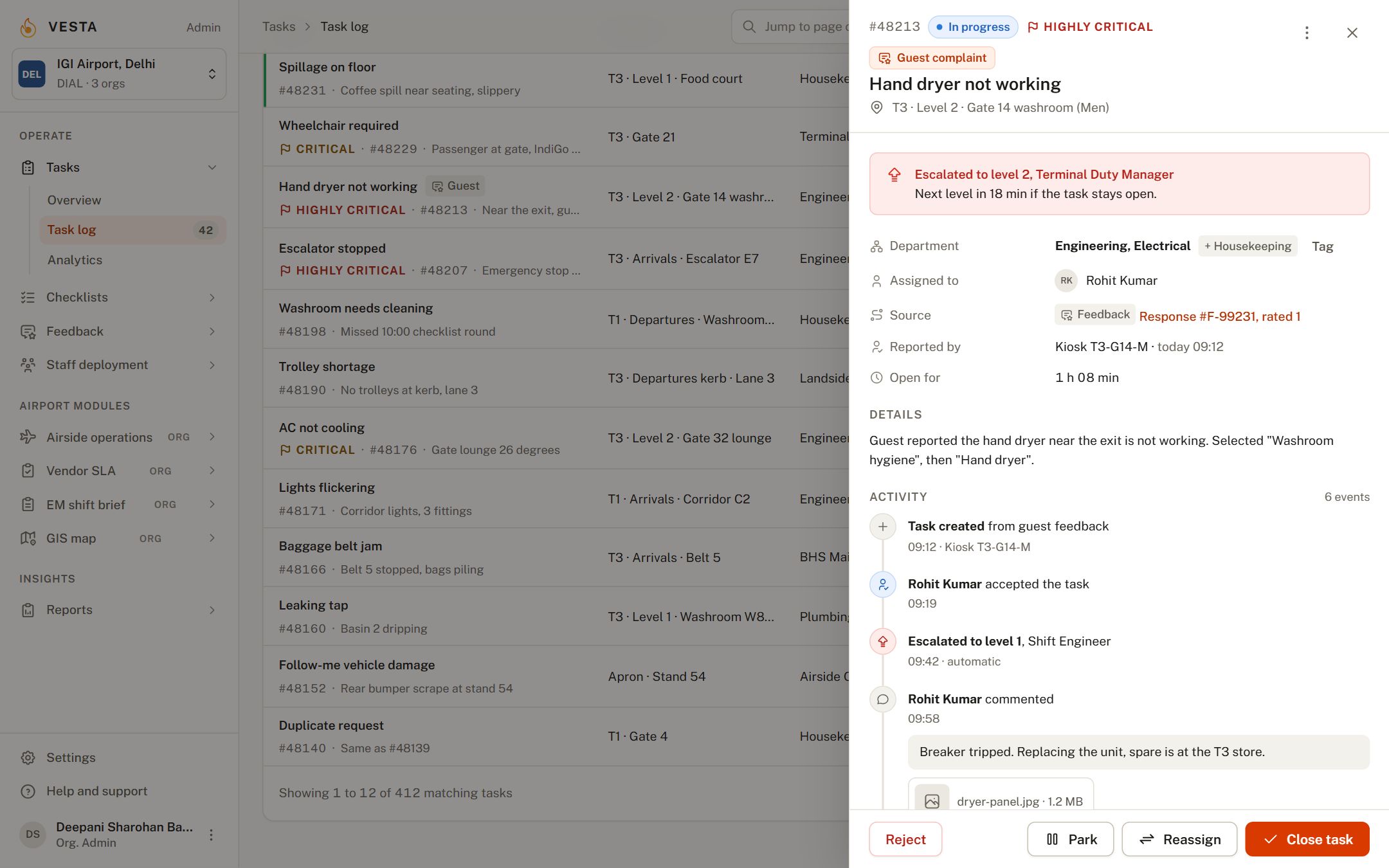
The list stays put. The task opens beside it.
Click a row and the task drawer shows facts, the escalation state, the full activity trail and the actions for that state. Triage is click, act, next. Reports cover operational efficiency, daily incidents, SLA performance and before-and-after photo records, and can be scheduled to email.
What customers report.
Frequently asked.
How are ad hoc incidents handled?
Anyone with the app can raise a task on the spot with a type, a location and a photo. The type decides which department receives it and how long it may stay open before it escalates.
Is there a limit on users, departments or tasks?
No. Add as many users, departments, locations and task types as your operation needs.
Can tasks be created automatically?
Yes. A guest rating below your threshold, or a "No" on a checklist item, raises a task with the location already filled in.
What reports are there?
Operational efficiency, daily incident and SLA reports, analytics on every task and department, and before-and-after photo records. Any of them can be scheduled to email.
Can it be adapted to how we work?
Task types, departments, escalation levels and report schedules are all configured per organization. We work with each airport on the details.
The rest of the platform.
Checklists
Scheduled inspections on a phone, started by scanning the QR code at the location. Photos where you require them, missed rounds in red, a PDF for every submission.
Rounds that prove themselves.Feedback
Kiosks, tablets and QR codes at washrooms, gates and lounges. Five faces, one tap, and a poor rating becomes a task for the right department before the guest has walked away.
Ask every guest. Act on every answer.Staff deployment
Digital deployment sheets tied to biometric attendance. Only staff who clocked in on the premises can be placed on a location, so shortage reports and monthly bills come straight from the record.
Deployment sheets your vendors cannot dispute.See Tasks on your own data.
A 30-minute walkthrough with your locations, departments and task types. No slides.